

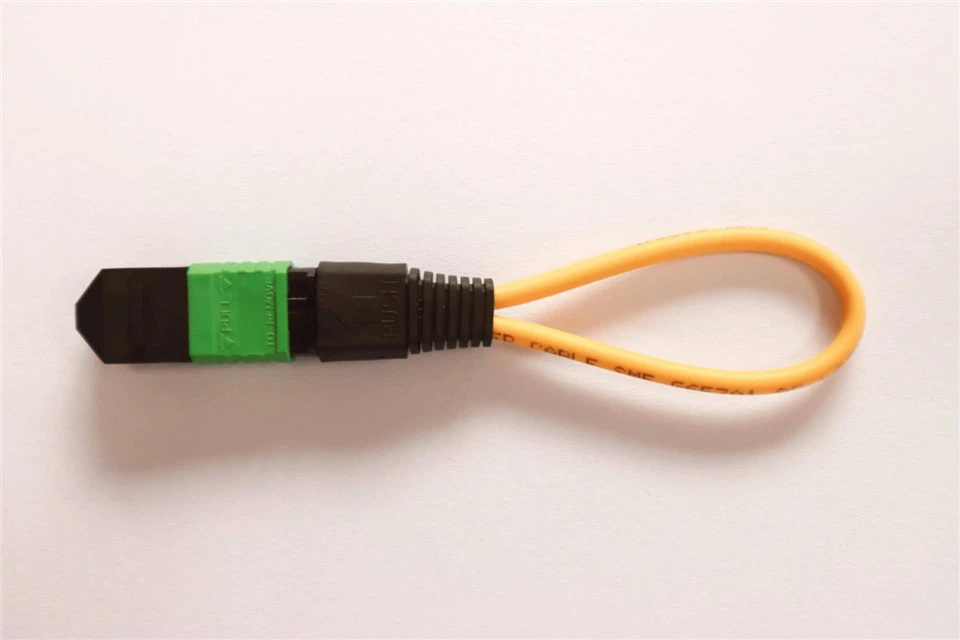
Have you ever wondered how big computer networks check their own health? They use a clever little tool called an MTP loopback. Imagine throwing a ball against a wall and catching it. If the ball comes right back to you, you know the path is clear. That is exactly what an MTP loopback does with light signals inside fiber optic cables.
In the world of fast internet, data travels as light beams inside glass strands. An MTP loopback plugs into a network port and sends that light right back to the source. This simple trick lets engineers test if the network equipment is working perfectly without running long cables across a whole building. It saves a massive amount of time during big setups.
Using an MTP loopback is the easiest way to find hidden network problems. If a computer cannot talk to the network, you plug this tool into the port. If the signal bounces back fine, you know the machine itself is healthy. It means the problem lies somewhere further down the road. It acts like a quick medical checkup for high-tech network gear.
The Basics of Fiber Optic Technology Made Simple
To understand an MTP loopback, we first need to look at fiber optic cables. Regular cables use electricity to move data, which can be slow and messy. Fiber optic cables use pure light instead, which moves at incredible speeds. Inside these cables, tiny glass threads carry data across rooms or even across huge oceans in milliseconds.
An MTP loopback is specially designed to handle these advanced light paths. The letters MTP stand for a specific type of high-density connector that holds many fibers at once. Instead of plugging in one single wire, an MTP connector plugs in twelve or twenty-four fibers all at the same time. This makes it a powerhouse for handling massive amounts of internet traffic.
When you use an MTP loopback, you are managing a superhighway of light. The tool safely loops the outgoing light signals directly back into the incoming slots. This creates a closed circuit that mimics a real working network link. It is the ultimate shortcut for checking if your hardware can send and receive data without any costly errors.
How an MTP Loopback Helps Test Your Network
Testing a network can be a huge headache for tech teams. Without an MTP loopback, you would need two people standing in different rooms to test a single cable link. One person would send a signal, and the other person would check if it arrived. This old method wastes time and causes miscommunication.
An MTP loopback solves this problem by allowing a single technician to test a port alone. You simply walk up to a machine, plug the MTP loopback into the open slot, and watch the test screen. The light travels out of the machine, passes through the loopback tool, and returns home instantly. It gives you immediate answers.
If the testing software shows a perfect connection, your hardware port is completely safe and ready. If the signal looks weak or broken, you know the port needs cleaning or repair. This fast feedback loop makes the MTP loopback an essential item in every network engineer’s daily toolkit. It turns complex science into a simple plug-and-play task.
Technical Specifications and Overview Table
Hardware Biography Table
| Specification Feature | Details and Measurements |
| Product Name | High-Density MTP Loopback Module |
| Connector Type | MTP Female or MTP Male |
| Fiber Count options | 12 Fibers, 24 Fibers, or 48 Fibers |
| Fiber Mode | Singlemode OS2 or Multimode OM3/OM4 |
| Insertion Loss | Typically less than 0.35 dB |
| Return Loss | Greater than 20 dB for Multimode |
| Color Codes | Aqua for OM3, Violet for OM4, Yellow for OS2 |
| Testing Application | 40G, 100G, and 400G Network Verification |
Different Types of MTP Loopback Modules Explained
Not all networks are built the same way, so these tools come in different styles. You can find an MTP loopback made for multimode fiber or singlemode fiber. Multimode tools use lasers that travel short distances, like inside a single office building. They usually have bright aqua or violet shells so you can spot them quickly.
Singlemode MTP loopback tools are built for long distances, like connecting two different cities. These tools use a very precise yellow cable design to handle sharp laser beams. Matching the correct loopback type to your specific network cable is highly important. If you mix them up, the light will scatter and give you wrong test results.
You also choose modules based on how many light paths live inside the connector. A 12-fiber MTP loopback is standard for most common network switches today. However, ultra-fast systems use a 24-fiber MTP loopback to double the data speeds. Knowing your network size helps you pick the exact tool required for your system upgrade.
The Role of an MTP Loopback in Data Centers
Data centers are giant warehouses filled with thousands of humming computers. These places handle all the videos, games, and websites we use every day. Because they deal with massive traffic, they rely heavily on the MTP loopback to keep things running smoothly. A single loose wire could cause thousands of websites to crash instantly.
Engineers use the MTP loopback during the initial setup of these massive data centers. Before connecting the data center to the outside internet, they test every single port. They plug an MTP loopback into the back of each server rack to ensure the internal wiring is flawless. This prevents future emergencies before customers ever log in.
Time is money in a busy data center environment. When a server goes offline unexpectedly, a technician uses an MTP loopback to isolate the issue in seconds. It tells them if the server port itself is broken or if the long floor cables are damaged. This speedy troubleshooting saves companies from losing valuable time and money.
Step by Step Guide to Using an MTP Loopback Safely
Using an MTP loopback is easy, but you must treat the tools with great care. First, always turn off any bright lasers before looking directly into a fiber port. Even though you cannot see the infrared light, it can harm your eyes. Safety should always come first when working with advanced optical gear.
Second, clean the tips of your MTP loopback before plugging it into any machine. Tiny dust particles can block the light paths and ruin your test scores. Use a special fiber cleaning pen to wipe the connector face clean. Once clean, gently push the MTP loopback into the port until you hear a solid click sound.
Now, look at your network management software to run the loopback test. The computer will send data packets through the port and count how many return safely. If the software shows zero lost packets, your test is a total success. Gently pull the outer housing to unlock and remove the tool when finished.
Common Mistakes to Avoid When Testing with Fiber Loops
The biggest mistake people make is using a dirty MTP loopback tool. Dust acts like a giant brick wall to a tiny beam of light. If your loopback is dirty, your test will say the port is broken even when it is perfectly fine. Clean your tools every single time you use them.
Another common error is pushing the connector into the port with too much brute force. Fiber optic parts are made of delicate glass and precise plastics. If you force an MTP loopback in at a bad angle, you can scratch the internal lenses permanently. Always line up the alignment keys gently before pushing it into place.
Finally, do not forget to check the polarity settings on your equipment. Light needs to travel out of the talk path and return through the listen path. If your MTP loopback does not match the polarity layout of your switch, the light will hit a dead end. Always check your equipment manual to verify compatibility before testing.
How to Care for and Store Your MTP Loopback Tools
To make sure your MTP loopback lasts for many years, you must store it correctly. Never leave these tools tossed loosely inside a messy toolbox where they can get scratched. Dust and rough tools will destroy the polished glass ends quickly. Always place the protective plastic dust cap back onto the tip immediately after use.
Store your MTP loopback modules inside a padded pouch or a dedicated hard plastic case. Keeping them away from moisture and extreme heat protects the internal optical fibers from warping. A well-protected tool will give you accurate test measurements for a very long time without failing you during crucial moments.
It is also smart to inspect the connector tips with a fiber microscope once in a while. This lets you see tiny scratches or oil smudges that normal eyes miss completely. If you notice persistent errors during tests, a deep cleaning or a tool replacement might be necessary to keep your work accurate.
Comparing MTP Loopback Tools with Traditional Patch Cables
You might wonder why you cannot just use a standard fiber patch cable instead of an MTP loopback tool. A regular cable is long, floppy, and easily tangled in tight spaces. Trying to twist a long cable around to plug into the same machine takes up valuable room inside cramped equipment racks.
An MTP loopback is incredibly compact and fits right into the palm of your hand. It does not have long trailing wires that can snag on other equipment or block cooling fans. This small size allows you to close the server rack doors even while running long-term diagnostic tests overnight.
Furthermore, an MTP loopback is factory-tuned to have very specific light loss values. This means it acts as a perfect reference point for your testing software. A regular cable can bend and change its values constantly, which ruins your testing accuracy. Investing in a real loopback module is always the smarter choice.
Future Trends in High Speed Fiber Optic Networking
As the world demands faster internet speeds, fiber technology must change to keep up. We are moving away from older slow speeds towards incredible 400G and 800G systems. These super-fast networks need advanced tools to test them, making the classic MTP loopback more important than ever before. New designs are constantly hitting the market.
Future MTP loopback modules will feature even smaller designs to fit into super-crowded modern gear. They will also feature built-in smart chips that can report data straight to an engineer’s smartphone. This means you will not even need a giant computer monitor to check your network health anymore.
No matter how fast the internet gets, the basic rule of looping light will never change. The reliable MTP loopback will remain a foundational piece of the tech world for decades to come. Staying updated on these tools ensures your business is always ready for the next generation of online communication speeds.
Conclusion and Next Steps for Your Network
Understanding the MTP loopback is a fantastic step toward mastering modern computer networks. This small but mighty tool removes the guesswork from fiber optic testing. It saves time, prevents costly mistakes, and ensures your data moves at the speed of light. Every great network starts with reliable testing habits.
If you manage an office network or a large data center, adding an MTP loopback to your kit is a smart move. Make sure to train your team on how to clean and connect them safely. Taking care of your testing tools means they will take care of your network when troubleshooting gets tough.
Are you ready to upgrade your network testing toolkit today? Take a look at your current switch speeds and choose the right loopback module for your needs. If you have any questions about picking the right model, leave a comment below or reach out to a local fiber expert for advice.
Frequently Asked Questions
Can I use a multimode MTP loopback on a singlemode system?
No, you should never mix these two types of fiber tools. Multimode and singlemode systems use different glass core sizes and different light wavelengths. If you mix them, the light will scatter, and your test will fail completely. Always match your tool color to your network cable type.
What does insertion loss mean for an MTP loopback?
Insertion loss measures how much light power is lost when the signal passes through the tool. A lower number is always better because it means the tool is highly efficient. Most high-quality tools have an insertion loss of less than 0.35 decibels, which keeps your test results accurate.
Do I need to clean an MTP loopback if it is brand new?
Yes, you should always clean a new tool right out of the package. Factory dust or plastic residue from the protective cap can easily cling to the glass end face. A quick click with a fiber cleaning pen guarantees a clear path for your testing lasers before the first use.
How many times can I plug in an MTP loopback before it wears out?
A high-quality MTP loopback is built to handle around 500 to 1,000 connections before the plastic latches begin to wear down. If you keep the glass ends clean and avoid dropping the module, it will deliver dependable test results for several years of regular field use.
What is the difference between a male and female MTP loopback?
The difference lies in the alignment pins inside the connector face. A male connector has two tiny metal pins sticking out, while a female connector has matching guide holes instead. You must check the inside of your equipment port to see which matching shape you need to connect properly.
Does an MTP loopback require batteries or external power to work?
No, it does not need any electricity or batteries at all. It is a completely passive device made entirely of optical fibers and plastic housing. It simply redirects the light beams that are already being generated by your active network switches, making it highly reliable and durable.
